LLM Application Development Framework — Eino is Now Open Source!
Today, after more than half a year of internal use and iteration at ByteDance, the Go-based comprehensive LLM application development framework — Eino — is officially open source under CloudWeGo!
Eino is based on clear “component” definitions, provides powerful “orchestration”, and covers the entire development lifecycle, aiming to help developers build the most sophisticated LLM applications as quickly as possible.
Have you ever had these feelings: wanting to add LLM capabilities to your application but unsure how to start in this relatively new field; wanting to continuously stay at the forefront of research and apply the latest industry achievements, but the application development framework you use hasn’t been updated for months; wanting to understand Python code in your project and confirm the type of a variable or parameter requires repeatedly checking the context; uncertain whether the model-generated results are good enough, wanting to use them but not daring to; needing extra exploration and learning for other supporting tools in necessary steps like debugging, tracing, and evaluation outside of development. If so, you’re welcome to learn about and try Eino, because Eino, as an LLM application development framework aimed at covering the entire DevOps lifecycle, has the following characteristics:
- Stable core, simple and easy-to-understand API, clear onboarding path, smooth learning curve.
- Ultimate extensibility, highly active R&D work, long-term sustainability.
- Based on the strongly-typed language Golang, code is readable, maintainable, and highly reliable.
- Backed by extensive practical experience from ByteDance’s core business lines.
- Provides ready-to-use supporting tools.
Eino has become ByteDance’s preferred full-code development framework for LLM applications internally, with multiple business lines including Doubao, TikTok, Coze, and hundreds of services already integrated.
Project address: https://github.com/cloudwego/eino, https://github.com/cloudwego/eino-ext
In the future, we will take the Eino open-source library as the core code repository, insisting on using the same codebase internally and externally, working with the community to build the best LLM application development framework.
Quick Introduction to Eino
Eino is an LLM application development framework covering the entire DevOps lifecycle, from best practice examples in Eino Examples to toolchains at each stage, all within Eino’s domain:
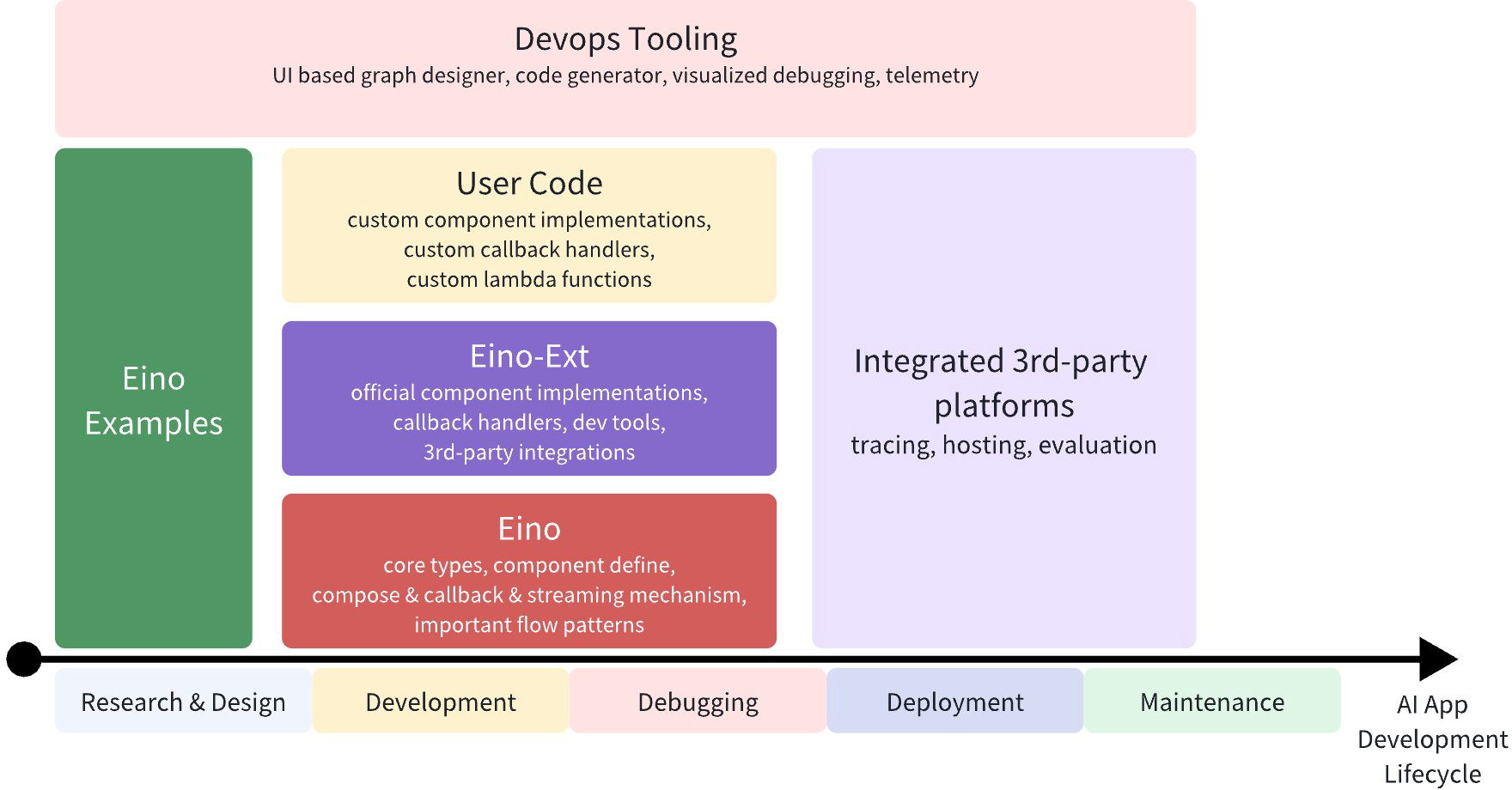
So what exactly can Eino do? First, Eino consists of individual LLM domain “components”. For example, the most core is the Chat Model for interacting with LLMs:
model, _ := ark.NewChatModel(ctx, config) // Create a Doubao LLM
message, _ := model.Generate(ctx, []*Message{
    SystemMessage("you are a helpful assistant."),
    UserMessage("what does the future AI App look like?")}
Using components directly like above is of course fine - Eino provides many useful component implementations to choose from. However, LLM applications have their own characteristics and patterns, such as:
- The core is the LLM, with business logic centered on “how to provide sufficient and effective context to the LLM” and “how to reliably let the LLM’s output affect the environment”. The core component types, data types, and interaction patterns can be enumerated, and the overall structure can be described by a directed graph.
- LLM output is streaming, meaning downstream of the model must effectively handle streaming data, including real-time stream processing, stream copying, merging multiple streams, concatenating single streams, etc.
- Building on directed graphs, a series of sub-problems emerge: concurrency handling, fan-in/fan-out, general-purpose aspects, option distribution, etc.
Eino’s orchestration capabilities are a comprehensive solution to these general problems.
Taking the ReAct Agent as an example: a ChatModel (LLM) “binds” Tools, receives input Messages, and the ChatModel autonomously determines whether to call a Tool or output the final result. Tool execution results become Messages fed back to the ChatModel as context for the next round of autonomous judgment.
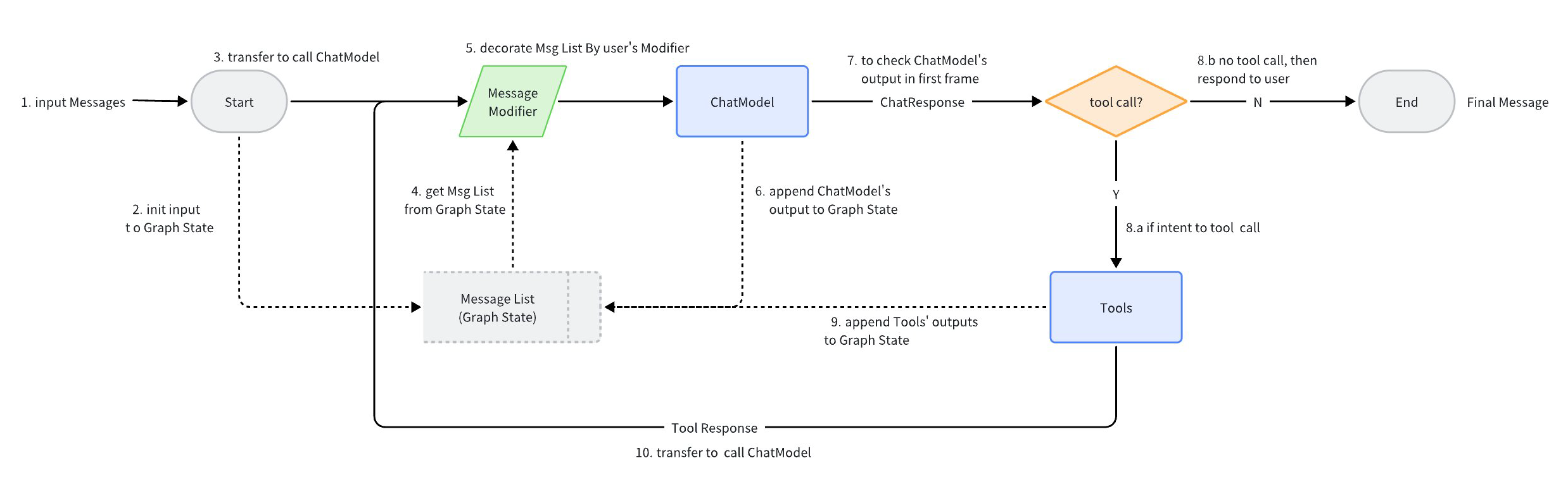
The above ReAct Agent, which performs autonomous decision-making and routing based on ChatModel, is implemented using Eino’s components and Graph orchestration. The code is clear and concise, mapping cleanly to the flowchart.
- Code implementation details: flow/agent/react
- ReAct Agent user manual: react_agent_manual
In Eino, this is a few dozen lines of graph orchestration code:
// Build a ReAct Agent, compiled into a Runnable with input []*Message and output *Message

// Create a Graph containing state, for storing request-dimension Message context
graph = NewGraph[[]*Message, *Message](
   WithGenLocalState(func(ctx context.Context) *state {
      return &state{Messages: make([]*Message, 0, config.MaxStep+1)}
   }))

// Store context and responses from a round into the Graph's temporary state
modelPreHandle = func(ctx context.Context, input []*Message, state *state) ([]*Message, error) {
    state.Messages = append(state.Messages, input...)
    return state.Messages, nil
}

_ = graph.AddChatModelNode(nodeKeyModel, chatModel, WithStatePreHandler(modelPreHandle))

_ = graph.AddEdge(START, nodeKeyModel)

_ = graph.AddToolsNode(nodeKeyTools, toolsNode)

// chatModel's output may be a stream of multiple Messages
// This StreamGraphBranch can complete judgment based on just the first packet of the stream, reducing latency
modelPostBranch = NewStreamGraphBranch(
   func(_ context.Context, sr *schema.StreamReader[*Message]) (endNode string, err error) {
      defer sr.Close()

      if msg, err := sr.Recv(); err != nil {
         return "", err
      } else if len(msg.ToolCalls) == 0 {
         return END, nil
      }

      return nodeKeyTools, nil
   }, map[string]bool{nodeKeyTools: true, END: true})

_ =  graph.AddBranch(nodeKeyModel, modelPostBranch)

// toolsNode execution results are fed back to chatModel
_ = graph.AddEdge(nodeKeyTools, nodeKeyModel)

// Compile Graph: type checking, callback injection, automatic stream conversion, generate executor
agent, _ := graph.Compile(ctx, WithMaxRunSteps(config.MaxStep))
Behind these few dozen lines of code, Eino automatically does several things:
- Type checking, ensuring adjacent node types align at compile time.
- Stream wrapping, the compiled Runnable supports both Invoke and Stream calls, regardless of whether internal Tools support streaming.
- Concurrency management, reads and writes to the public state are concurrent-safe.
- Aspect injection, if a component (like a tool) doesn’t implement callback injection itself, Eino auto-injects it.
- Option distribution, the compiled Runnable can flexibly receive and distribute options to specified nodes.
Eino’s Unique Advantages
Software applications based on large language models are in a rapid development phase, with new technologies, ideas, and practices constantly emerging. As application developers, we need to efficiently and reliably apply industry-consensus best practices, while continuously learning and upgrading our understanding to comprehensively grasp the possibilities in this new field. Therefore, an excellent LLM application development framework needs to both encapsulate the “unchanging” common core elements within the domain and agilely expand horizontally and vertically based on the latest developments.
On the other hand, currently mainstream frameworks like LangChain and LlamaIndex are based on Python. While leveraging Python’s rich ecosystem enables rapid implementation of diverse functionality, they also inherit Python’s issues as a dynamic language - “weak type checking” and “high long-term maintenance costs”. As LLM applications rapidly enter large-scale online operation, the high reliability and high maintainability achieved through Golang, a strongly-typed language, become increasingly valuable.
LLM-based application development is a relatively new field, sometimes requiring learning by doing and validating understanding through practice. Leveraging ByteDance’s diverse scenarios, rapid iteration, and massive feedback from high-frequency applications like Doubao and TikTok, Eino has unique advantages in practice-driven design.
Finally, production-grade frameworks need to face real, complex business scenarios. Therefore, beyond intuitive and easy-to-use API design, providing purposefully designed development tools can effectively help developers understand and handle complexity and accelerate the development process.
Stable Core
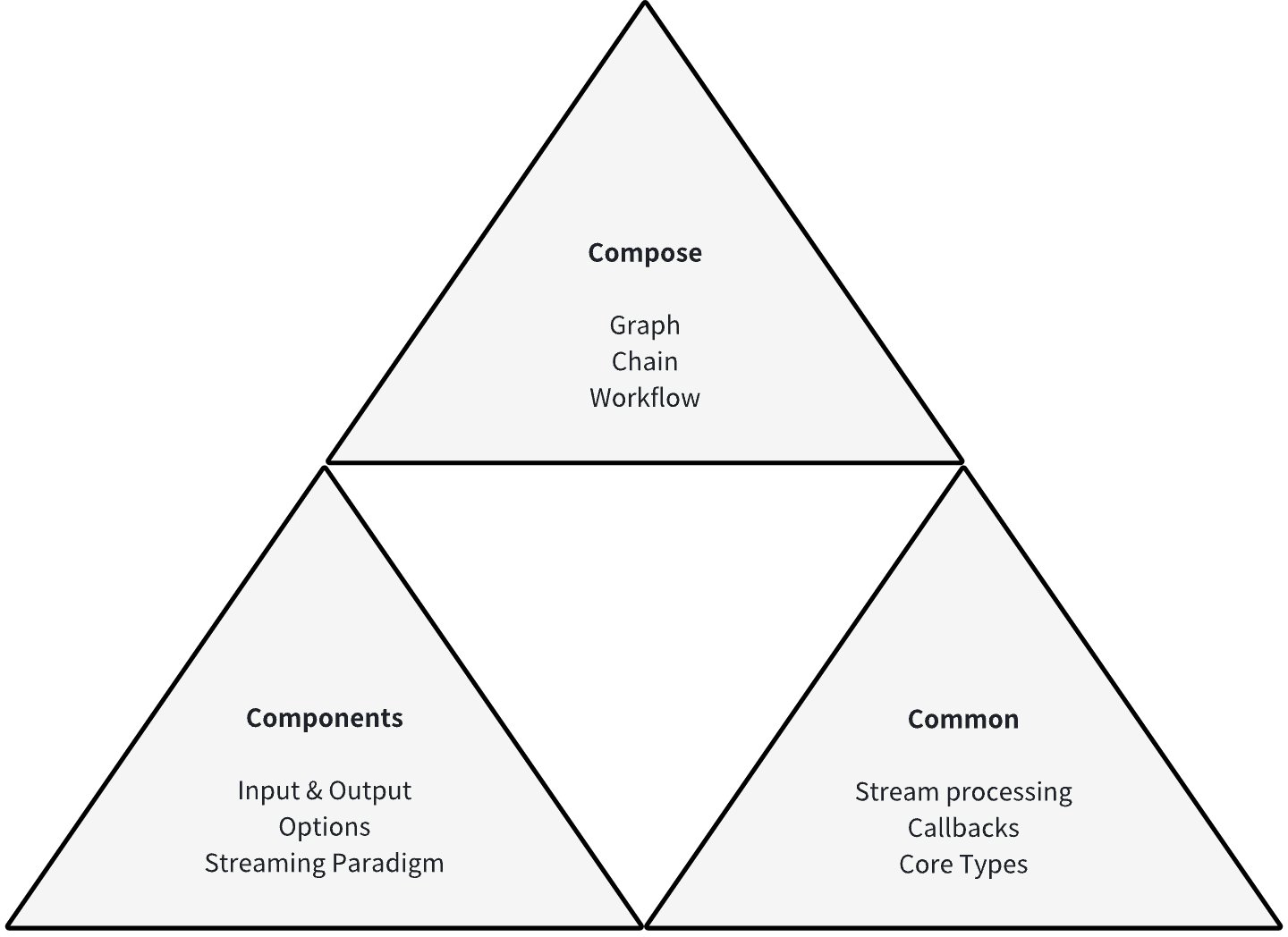
We believe there exists a common list of components that together constitute the common building blocks of LLM applications. Each type of component as an interface has complete, stable definitions: specific input and output types, clear runtime options, and sensible stream processing paradigms.
Building on clear component definitions, we believe that LLM application development has universal foundational capabilities, including but not limited to: streaming programming capabilities for handling model output; Callback capabilities for supporting aspect functionality and exposing internal component state; option extension capabilities beyond the component interface definition scope for specific implementations.
Building on component definitions and universal foundational capabilities, we believe that LLM application development has relatively fixed data flow and orchestration paradigms: centered on ChatModel (LLM), injecting user input and system prompts through ChatTemplate, injecting context through Retriever, Document Loader & Transformer, generating through ChatModel, outputting Tool Calls and executing them, or outputting final results. Based on this, Eino provides different orchestration paradigms for the above components: Chain, a chain-style directed acyclic graph; Graph, a directed graph or directed acyclic graph; Workflow, a directed acyclic graph with field mapping capabilities.
These designs and functionalities together form Eino’s stable core:
Agile Extension
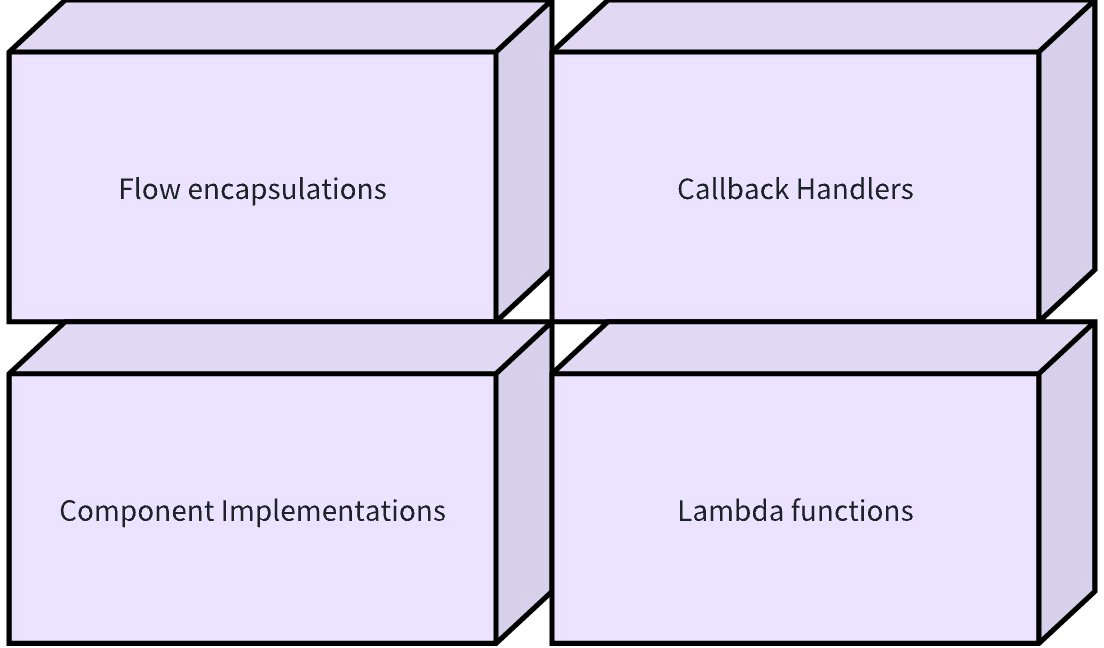
Each type of component can be horizontally extended with different implementations. For example, the ChatModel component can have different implementations like OpenAI, Gemini, Claude, etc. These specific implementations, while implementing the component interface to participate in orchestration as components, can implement and continuously extend their own special functionalities.
When actual business scenarios require functionality that needs to enter orchestration but doesn’t correspond to any component definition, Eino supports declaring custom functions as Lambda type. Lambda has user-declared input/output and option types, supports all stream processing paradigms, has complete Callback capabilities, and is equivalent to official components from an orchestration perspective.
In the LLM application development field, there exist and will continue to emerge specific orchestration paradigms of multiple components. These paradigms encapsulate validated research results or practical experience, such as ReAct Agent, Host Multi-Agent, etc. These ready-to-use encapsulations condense best practices in LLM application development and will continue to expand vertically as our understanding improves.
During component and graph execution, developers can embed custom callback logic at fixed points to inject aspect functionality.
In summary, the Eino framework has full extensibility:
Highly Reliable and Maintainable
When writing Eino code in Golang, developers can fully leverage Golang’s strong typing features, declaring specific types for all components, Lambdas, orchestration products, etc. This is like drawing a precise map for the code, allowing developers to follow clear paths for maintenance and extension. Even as project scale grows and functionality continues to iterate, high maintainability can still be preserved.
At the same time, Eino’s orchestration capabilities fully utilize the compile-time validation capabilities of the strong type system, exposing type matching issues as early as possible during graph compilation rather than graph runtime. Early and clear exposure of type matching issues helps developers quickly locate and fix them, reducing hard-to-troubleshoot failures and performance issues caused by type errors at runtime.
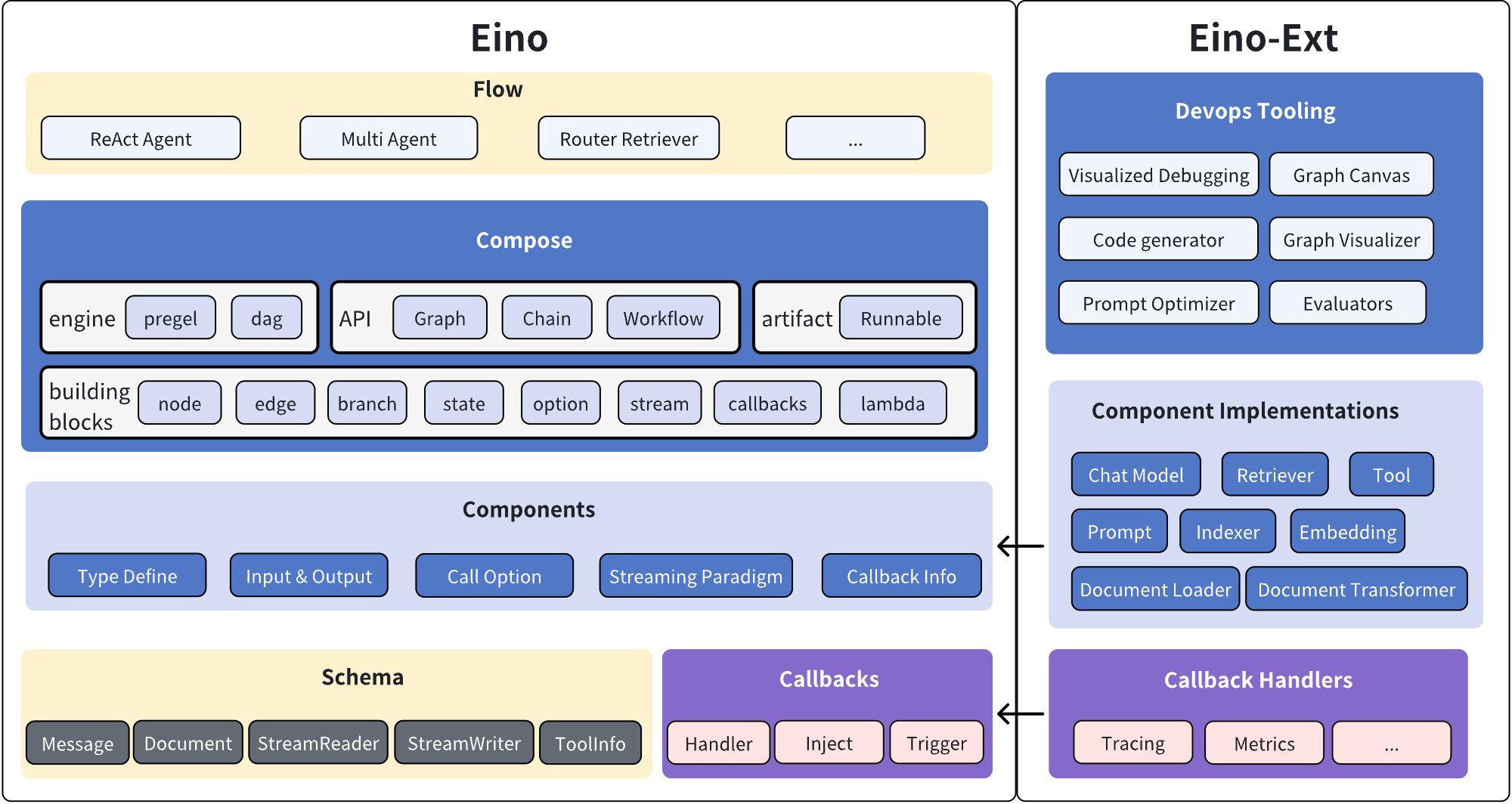
On the other hand, Eino follows modular design, with the core library and each component implementation being separate go modules, with each go module achieving minimal dependencies. Additionally, API design follows principles of “simplicity”, “intuitiveness”, and “isomorphism”, supplemented by comprehensive documentation from shallow to deep, trying to make the learning curve smoother. Most importantly, Eino adopts clear layered design, with clear responsibilities and cohesive functionality at each layer, improving maintainability while better ensuring stability.
Eino Framework Structure Diagram:
Practice-Driven
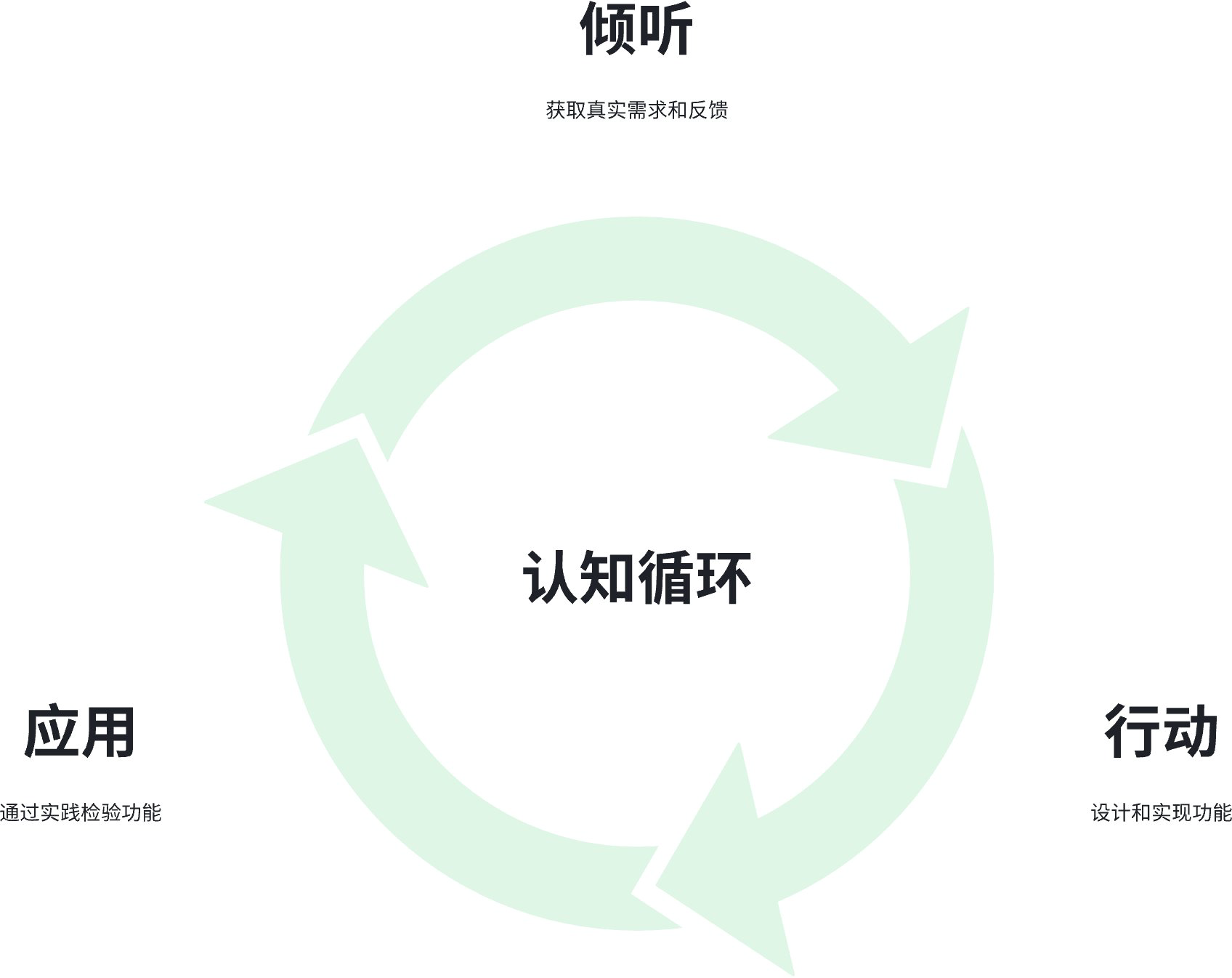
The design and development process of the Eino framework is rooted in two foundations: “meeting real needs” and “practice-driven design”. The functionality evolution process is tightly combined with the integration process of ByteDance’s various business lines, always listening to developers’ voices and validating design reasonableness through actual usage effects. For example, we received the requirement from TikTok to “enable field-level granularity data mapping and passing in graphs”, which became the basis for designing Workflow; listening to usage pain points from Doubao, we enhanced the Message struct as the model input/output type. In the future open-source ecosystem co-building process, we will continue to adhere to these principles, meeting the real needs of a broader range of users and developers, and seriously practicing and refining across a larger scope.
Tooling Ecosystem
Tracing, debugging, and visualization are three important supporting tools for orchestration engines. Eino has built-in tracing callbacks and integrates with APMPlus and Langfuse platforms. It also provides IDE plugins that allow visualizing the orchestrated graph at any time during coding, debugging runs, and even quickly building graphs through UI drag-and-drop and exporting as Eino code.
Quick Start
For learning and using Eino, we provide comprehensive Eino user manuals to help everyone quickly understand concepts in Eino and master skills for designing AI applications based on Eino. Get started with “Eino: Quick Start” now~
For any questions, you can communicate with us and provide feedback through the Lark group below or Eino Issues~
Related Links
Project address: https://github.com/cloudwego/eino, https://github.com/cloudwego/eino-ext
Project website: https://www.cloudwego.io
Scan the QR code to join the Lark community group: